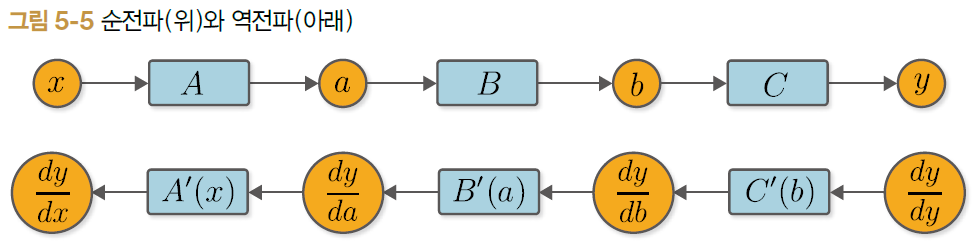
순전파를 한 번만 해주면 어떤 계산이라도 상관없이 역전파가 자동으로 이루어지는 구조 만들기
Define-by-Run이란 딥러닝에서 수행하는 계산들을 계산 시점에 ‘연결’하는 방식으로, ‘동적 계산 그래프’라고 함
7.1 역전파 자동화의 시작
역전파 자동화로 가는 길은 변수와 함수의 ‘관계’를 이해하는 데서 출발
함수 관점에서 변수는 ‘입력’과 ‘출력’에 쓰임
변수 과점에서 함수는 ‘창조자’ 혹은 ‘부모’
일반적인 순전파가 이루어지는 시점에 ‘관계’를 맺어줌
1 2 3 4 5 6 7 8 9
# steps/step07.py classVariable: def__init__(self, data): self.data = data self.grad = None self.creator = None# 인스턴스 변수 추가
defset_creator(self, func):# creator 설정 self.creator = func
creator라는 인스턴스 변수 추가, creator 설정을 위한 set_creator 메서드 추가
1 2 3 4 5 6 7 8 9 10
# steps/step07.py classFunction: def__call__(self, input): x = input.data y = self.forward(x) output = Variable(y) output.set_creator(self) # Set parent(function) self.input = input self.output = output # Set output return output
순전파를 계산하면 그 결과로 output이라는 Variable 인스턴스가 생성
oupput이 creator를 기억
1 2 3 4 5 6 7 8 9 10 11 12 13 14 15
A = Square() B = Exp() C = Square()
x = Variable(np.array(0.5)) a = A(x) b = B(a) y = C(b)
assert y.creator == C assert y.creator.input == b assert y.creator.input.creator == B assert y.creator.input.creator.input == a assert y.creator.input.creator.input.creator == A assert y.creator.input.creator.input.creator.input == x
assert문은 조건을 충족하는지 여부를 확인하는 데 사용
7.2 역전파 도전!
함수를 가져온다.
함수의 입력을 가져온다.
함수의 backward 메서드를 호출한다.
1 2 3 4 5
y.grad = np.array(1.0)
C = y.creator # 1. 함수를 가져온다. b = C.input# 2. 함수의 입력을 가져온다. b.grad = C.backward(y.grad) # 3. 함수의 backward 메서드를 호출한다.
1 2 3
B = b.creator # 1. 함수를 가져온다. a = B.input# 2. 함수의 입력을 가져온다. a.grad = B.backward(b.grad) # 3. 함수의 backward 메서드를 호출한다.
1 2 3 4
A = a.creator # 1. 함수를 가져온다. x = A.input# 2. 함수의 입력을 가져온다. x.grad = A.backward(a.grad) # 3. 함수의 backward 메서드를 호출한다. print(x.grad)
defbackward(self): f = self.creator # 1. Get a function if f isnotNone: x = f.input# 2. Get the function's input x.grad = f.backward(self.grad) # 3. Call the function's backward x.backward()
backward 메서드가 재귀적으로 호출면서 자동화
1 2 3 4 5 6 7 8 9 10 11 12 13
A = Square() B = Exp() C = Square()
x = Variable(np.array(0.5)) a = A(x) b = B(a) y = C(b)
defbackward(self): funcs = [self.creator] while funcs: f = funcs.pop() # 1. Get a function x, y = f.input, f.output # 2. Get the function's input/output x.grad = f.backward(y.grad) # 3. Call the function's backward
if x.creator isnotNone: funcs.append(x.creator)
처리해야 할 함수들을 funcs라는 리스트에 차례로 집어넣음
while 블록 안에서 funcs.pop()을 호출하여 처리할 함수 f를 꺼냄
f의 backward 메서드를 호출
f.input과 f.output에서 함수 f의 입력과 출력 변수를 얻음
f.backward()의 인수와 반환값을 올바르게 설정
1 2 3 4 5 6 7 8 9 10 11 12 13 14
# steps/step08.py A = Square() B = Exp() C = Square()
x = Variable(np.array(0.5)) a = A(x) b = B(a) y = C(b)
# steps/step09.py classVariable: def__init__(self, data): if data isnotNone: ifnotisinstance(data, np.ndarray): raise TypeError('{} is not supported'.format(type(data)))
self.data = data self.grad = None self.creator = None
defset_creator(self, func): self.creator = func
defbackward(self): if self.grad isNone: # grad가 None이면 미분값 생성 self.grad = np.ones_like(self.data)
funcs = [self.creator] while funcs: f = funcs.pop() x, y = f.input, f.output x.grad = f.backward(y.grad)
if x.creator isnotNone: funcs.append(x.creator)
data가 None이 아니고 ndarray 인스턴스도 아니면 TypeError 예외 발생
1 2 3 4
# steps/step09.py x = Variable(np.array(1.0)) # OK x = Variable(None) # OK x = Variable(1.0) # NG
---------------------------------------------------------------------------
TypeError Traceback (most recent call last)
<ipython-input-53-33bce631aee3> in <module>
2 x = Variable(np.array(1.0)) # OK
3 x = Variable(None) # OK
----> 4 x = Variable(1.0) # NG
<ipython-input-50-830a6874675c> in __init__(self, data)
3 if data is not None:
4 if not isinstance(data, np.ndarray):
----> 5 raise TypeError('{} is not supported'.format(type(data)))
6
7 self.data = data
TypeError: <class 'float'> is not supported
ndarray나 None이면 아무 문제 없지만, 다른 데이터 타입을 입력하면 예외 발생
잘못된 데이터 타입을 사용했음을 즉시 알 수 있음
1 2 3 4
x = np.array([1.0]) y = x ** 2 print(type(x), x.ndim) print(type(y))
<class 'numpy.ndarray'> 1
<class 'numpy.ndarray'>
x는 1차원 ndarray
y의 데이터 타입도 ndarray
1 2 3 4
x = np.array(1.0) # 0차원 ndarray y = x ** 2 print(type(x), x.ndim) print(type(y))
<class 'numpy.ndarray'> 0
<class 'numpy.float64'>
x는 0차원의 ndarray인데, 제곱(x**2)을 하면 np.float64가 되어버림
Variable은 데이터가 항상 ndarray 인스턴스라고 가정하기 때문에 대처를 해줘야 함
1 2 3 4 5
# steps/step09.py defas_array(x): if np.isscalar(x): return np.array(x) return x
np.isscalar는 입력 데이터가 numpy.float64 같은 스칼라 타입인지 확인하는 함수
1 2
import numpy as np np.isscalar(np.float64(1.0))
True
1
np.isscalar(2.0)
True
1
np.isscalar(np.array(1.0))
False
1
np.isscalar(np.array([1, 2, 3]))
False
이처럼 x가 스칼라 타입인지 쉽게 확인 가능
as_array함수는 입력이 스칼라인 경우 ndarray 인스턴스로 변환
as_array라는 편의 함수가 준비되었으니 Function 클래스에 코드 추가
1 2 3 4 5 6 7 8 9 10 11 12 13 14 15 16
# steps/step09.py classFunction: def__call__(self, input): x = input.data y = self.forward(x) output = Variable(as_array(y)) # 편의 함수 추가 output.set_creator(self) self.input = input self.output = output return output
Welcome to Hexo! This is your very first post. Check documentation for more info. If you get any problems when using Hexo, you can find the answer in troubleshooting or you can ask me on GitHub.
$ ipython In [1]: from notebook.auth import passwd In [2]: passwd() Enter password: dss Verify password: dss sha1:6600c5733ef3:b683d6afba16b3403fdf9a75ac38b7d8e7f733bb
설정파일 접속
1
$ sudo vi /home/ubuntu/.jupyter/jupyter_notebook_config.py
설정 파일 수정
1 2 3
c.NotebookApp.ip = '172.31.26.225' # 내부 IP 주소 c.NotebookApp.open_browser = False c.NotebookApp.password = 'sha1:6600c5733ef3:b683d6afba16b3403fdf9a75ac38b7d8e7f733bb'
서버의 8888 포트 활성화
서버에서 jupyter notebook 실행
브라우져로 접속
http://<public ip>:8888
6. Mysql 설치 및 설정
mysql-server, mysql-client 설치
$ sudo apt install mysql-server
mysql 보안 설정 ( n-y-n-y-y 순으로 입력해줍니다. )
$ sudo mysql_secure_installation
1 2 3 4 5 6 7
- Would you like to setup VALIDATE PASSWORD plugin? Press y|Y for Yes, any other key for No: n - 패스워드 설정 : dss - Remove anonymous users? (Press y|Y for Yes, any other key for No) : y - Disallow root login remotely? (Press y|Y for Yes, any other key for No) : n - Remove test database and access to it? (Press y|Y for Yes, any other key for No) : y - Reload privilege tables now? (Press y|Y for Yes, any other key for No) : y
최초 패스워드 설정
1 2 3 4 5 6
$ sudo mysql mysql> SELECT user,authentication_string,plugin,host FROM mysql.user; mysql> ALTER USER 'root'@'localhost' IDENTIFIED WITH mysql_native_password BY 'dss'; mysql> FLUSH PRIVILEGES; mysql> SELECT user,authentication_string,plugin,host FROM mysql.user; mysql> exit
접속
1 2
$ mysql -u root -p Enter password: dss
외부 접속 허용
mysql 설정파일 bind-address = 0.0.0.0 으로 수정
$ sudo vi /etc/mysql/mysql.conf.d/mysqld.cnf
1
bind-address = 0.0.0.0
외부접속이 허용되도록 mysql 설정
1
mysql> grant all privileges on *.* to 'root'@'%' identified by 'dss';
snake case : fast_campus : 변수, 함수 _ camel case : FastCampus, fastCampus : 클래스
4. 데이터 다입
RAM 저장공간을 효율적으로 사용하기 위해 저장공간의 타입을 설정
동적타이핑
변수 선언시 저장되는 값에 따라서 자동으로 데이터 타입이 설정
기본 데이터 타입 : int, float, bool, str
컬렉션 데이터 타입 : list, tuple, dict
1
2
3
4
a = 1 # int a = 1 b = "python" type(a), type(b)
(int, str)
1
2
3
4
5
6
# 기본 데이터 타입 : int, float, bool, str a = 1 b = 1.2 c = True d = "data" type(a),type(b),type(c),type(d)
(int, float, bool, str)
1
a + b
2.2
1
a + d
---------------------------------------------------------------------------
TypeError Traceback (most recent call last)
<ipython-input-22-4fbab87c839c> in <module>
----> 1 a + d
TypeError: unsupported operand type(s) for +: 'int' and 'str'
1
2
3
# 데이터 타입에 함수 : 문자열 # upper : 대문자로 변환 e = d.upper()